Unicorn Rainbow Font
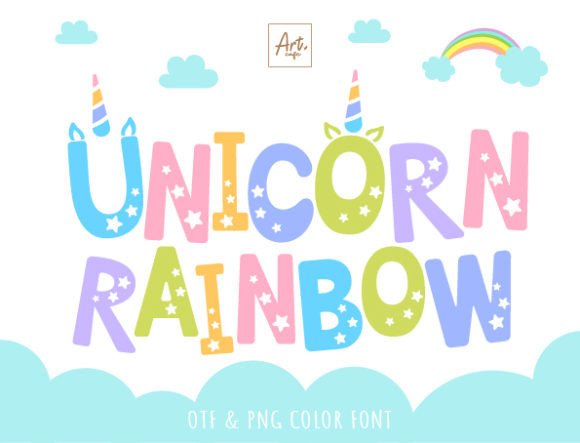
If you’ve ever searched for a font that instantly lifts a design—something playful yet polished, bold without being overwhelming, and undeniably joyful—you’ve likely landed on Unicorn Rainbow. It’s not just another “cute” typeface. It’s a carefully crafted display font built for visibility, versatility, and emotional resonance—especially when speaking to or about children, creativity, and lighthearted branding.
What makes Unicorn Rainbow stand out isn’t just its cheerful aesthetic—it’s how thoughtfully it balances function and charm. Designed as a bold, all-caps display font, it supports the full English character set (A–Z, numerals, punctuation, and common symbols), so you won’t hit a wall mid-project trying to type “&”, “@”, or even an em dash. That completeness matters—whether you’re labeling classroom supplies, designing a birthday banner, or mocking up product packaging for a kids’ subscription box.
Why Designers Reach for Unicorn Rainbow Again and Again
At its core, Unicorn Rainbow is engineered for impact at a glance. Its generous letter spacing, rounded terminals, and subtle bounce in baseline rhythm give it energy without sacrificing readability—even at smaller sizes on stickers or planner tabs. Unlike many novelty fonts that sacrifice legibility for flair, Unicorn Rainbow keeps clarity front and center. That’s why educators use it for visual schedules, small-business owners choose it for Etsy shop banners, and freelance designers drop it into client pitch decks for children’s book concepts or toy line identities.
The black (monochrome) version is especially practical: it’s fully compatible with Cricut Design Space, Sure Cuts A Lot, and other major cutting machines. That means if you’re crafting custom t-shirts for a preschool fundraiser, vinyl decals for nursery walls, or personalized mugs for a baby shower, you can cut, weed, and apply with confidence—no workarounds needed.
Color Version: Vibrant—but With Limits
The color version of Unicorn Rainbow adds layers of rainbow gradients directly into each glyph. It’s eye-catching, fun, and perfect for digital mockups, social media graphics, or print-ready PDFs where color fidelity matters. But here’s what many overlook: this version isn’t universally supported. It works natively in Adobe Photoshop, Illustrator, Silhouette Studio (with Designer Edition), and Inkscape—but not in Cricut Design Space or most web-based editors.
Crucially, the OTF and TTF files for the color variant won’t load correctly in Cricut. Attempting to do so often results in missing glyphs or flat black outlines instead of rainbows. If your workflow includes both digital and physical outputs, plan ahead: use the monochrome file for cutting projects and reserve the color version for screen-based deliverables like Instagram carousels, printable activity sheets, or brand style guides.
Real-World Uses You Might Not Expect
- Classroom & homeschool tools: Teachers print Unicorn Rainbow headers for weekly chore charts, emotion check-in boards, or sight-word flashcards—its bold weight holds up well when photocopied or laminated.
- Kid-focused product design: From organic baby soap labels to reusable snack pouch tags, the font adds warmth and approachability without infantilizing the brand.
- Digital planners & Notion templates: When styled with soft pastel backgrounds, Unicorn Rainbow creates inviting section dividers and title blocks that feel intentional—not cutesy.
- Small-batch merch: Etsy sellers report higher engagement on listings featuring Unicorn Rainbow in mockups—particularly for stickers, enamel pins, and canvas totes aimed at moms, teachers, and therapists.
- Therapeutic & special needs resources: Occupational therapists use it in visual timers and sensory diet trackers because its open counters and consistent stroke width reduce visual fatigue for neurodivergent learners.
What to Watch For Before You Download
Not every “rainbow” font delivers on usability—and Unicorn Rainbow is no exception to the rule that aesthetics require context. First, confirm your end use: if your project involves cutting vinyl or iron-on, stick with the black version. Second, test it early in your workflow. Load it into your primary design app before building complex layers—some versions of Silhouette Studio require manual activation of color fonts via the “Font Manager” panel.
Also keep licensing in mind. While personal use is typically included, commercial applications—like selling digital downloads that embed the font or using it in client-branded assets—may require an extended license. Always review the terms from the original source, especially if distributing editable files (e.g., Canva templates or printable kits).
A Note on Pairing & Hierarchy
Unicorn Rainbow shines brightest when paired intentionally. Its boldness means it shouldn’t carry body text—or even subheadings—in most cases. Try pairing it with clean, neutral sans-serifs like Montserrat, Poppins, or Lato for contrast and balance. For print projects, set Unicorn Rainbow at 36–72 pt for headlines and scale down only when necessary; its design doesn’t compress gracefully below 24 pt in most layouts.
You’ll also find it performs best with ample whitespace. Crowding it with dense imagery or competing patterns dulls its magic. Let it breathe—and let it anchor your message instead of competing with it.
Whether you're launching a new line of eco-friendly kids’ toys, prepping lesson plans for kindergarten, or designing a joyful brand identity for a pediatric therapy practice, Unicorn Rainbow offers more than whimsy. It delivers clarity, compatibility, and quiet professionalism beneath the sparkle. And in a world where attention is scarce and authenticity is valued, that kind of thoughtful design isn’t just nice to have—it’s essential.
For deeper technical guidance—including step-by-step instructions for loading color fonts in Illustrator or troubleshooting Cricut compatibility—refer to our Ultimate Font Guide.